0:00
USB-C charger has stopped working. It
0:02
already had some issues, so I had to use
0:05
some tape because we could start seeing
0:08
the cables inside, and it worked fine
0:11
for years, but lately when I was trying
0:14
to charge, sometimes it did not charge,
0:17
and it was not an electricity issue
0:18
because the TV was working, everything
0:20
else was working on the exact same plug,
0:23
but sometimes it works, sometimes it
0:25
doesn't, so I cannot trust it anymore.
0:27
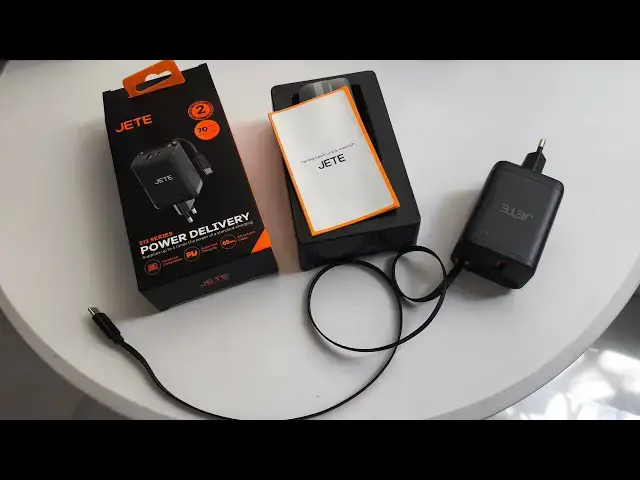
Anyway, I bought a replacement. We will
0:29
open it now. But first, let's try again
0:33
to charge. So, also, the issue I have is
0:35
it is very heavy. So, on a plugs like
0:38
here in Vietnam, when I plug it,
0:40
sometimes it does not stay in the plug
0:43
because it is too heavy, and it falls,
0:45
and I have to put something under it to
0:47
leave it in position because the the
0:49
charging block is too heavy. It's
0:54
200 g. So, let's check if it is working.
0:58
Now, it is working, but sometimes for no
1:01
reason it stopped working. So, I bought
1:05
around $15, and it is a power delivery.
1:08
I made sure that it has the same
1:11
capabilities. So, here it is a USB
1:14
C up to 70 W maximum, and my current
1:18
Asus official charger is 65 W.
1:21
So, let's unplu- let's um
1:24
unbox this JT uh plug and see if it is
1:29
good. Now, first, let's remove the
1:34
It comes with 2 years warranty. It's up
1:36
to 70 W. I can plug a few devices at the
1:40
same time, but of course, if I plug more
1:43
um the power is spread out, so it will
1:47
two devices charging at 70 W, but it
1:50
will be split between
1:52
uh everything that's plugged in. So,
1:55
here we go. I open this charger.
1:59
And this charger comes with built-in
2:02
USB-C retractable retractable cable. So,
2:08
we have behind the warranty card. No,
2:13
manual. And now let's take it out
2:19
It is kind of hard. Okay, so I bought
2:23
Uh let's see which one is heavier.
2:27
Well, I would say it's actually the more
2:29
or less the same weight. Uh probably 200
2:31
g, but uh give or take. Okay, there is
2:33
more plastic around. I will keep the
2:36
plastic wrap on the side. And here we
2:38
go. We have the USB-C
2:40
cable, but it's retractable. We have one
2:45
and one plug for USB-C. So, USB uh type
2:49
And here we have the cable that can get
2:52
out. So, let's check if it is working.
2:54
Yes, wow. Okay. Well, the cable is not
2:58
very long, so this might be an issue.
3:01
Uh they say how long they say?
3:04
Uh they don't say how long is the cable.
3:09
Okay, 65 cm. So, 1 m.
3:13
Okay, I'm not sure if this is 1 m, but
3:15
if they say it is, I will trust them.
3:18
And now let's check if it is charging.
3:23
Oh, wow. Actually, that is very short.
3:26
That is very short, so let's plug in.
3:29
Yes, the laptop is charging. It is
3:32
working fine. Oh, yeah. The only issue
3:34
that the cable, the built-in cable is
3:36
kind of short, so I'm not sure I would
3:41
uh someone that wants to use it really
3:43
just for the laptop to buy it because
3:45
often um you take your laptop away from
3:49
from the charging port,
3:51
uh from the from the wall plugs, and
3:55
as you can see it's not very easy. Like
3:57
for example here, if I wanted to work on
4:00
now the the cable is very very limited.
4:02
So, I recommend either
4:05
getting your own USB-C cable, a longer
4:09
yeah, or actually even better, just get
4:14
without this built-in
4:16
cable, which is really too
4:20
All right, but for fitting yours, if the
4:25
wall plug does not work anymore, it is a
4:31
And let's see if the cable goes back in.
4:36
And here we go. It is
4:37
It takes less space, which is also good,
4:40
but the cable is shorter. So, here
4:47
Yeah, also the the the pins now are
4:49
going sideways. So, I'm not sure when
4:52
plug will actually totally stop working.
4:55
Now it already happened a few times.
4:58
It doesn't work anymore, and here we go.
5:01
So, the new charger is clearly smaller.
5:04
It takes less space, so it's better for
5:06
travel, but not ideal because the
5:08
cable built-in cable is too short. So,
5:11
better to travel with your own USB-C
5:13
cable if you are using that, especially
5:15
to charge your laptop because you most
5:17
likely will have your laptop far away
5:19
from the charging port. At least in my
5:20
experience, that's always
5:22
usually the the case. So, yeah. Good
5:28
I'm not sure if it is perfect, actually.
5:30
But as an emergency, that's fine. And 70
5:32
W, which is more than my official plug,