Up next in 10


I used FlexClip to stitch together my AI-generated videos and fix a horizontal video that should have been vertical — try FlexClip here: https://yb.digital/flex
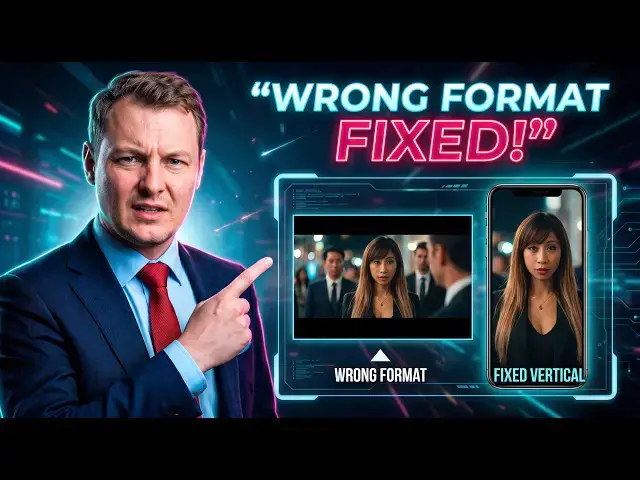
In the previous video, I accidentally generated one part of my AI micro drama in horizontal format instead of vertical. Rather than throw away the footage, I used FlexClip to combine the videos and reframe the horizontal footage for a 9:16 social media video.
The trick is simple: instead of trying to magically convert the entire horizontal frame into vertical, I split the video into smaller sections and manually reposition and zoom each section to keep the important characters visible.
It takes a few small cuts, especially when the camera or characters move, but it lets me rescue footage that would otherwise have the wrong aspect ratio.
I also adjust the audio across the scenes and export the final stitched video. The result isn't perfect, but it's good enough to turn the two AI-generated clips into one continuous vertical micro drama with a final close-up cliffhanger.
The lesson: generating your AI video in the correct format from the beginning is much easier, but FlexClip can help rescue a video when you get it wrong.
👉 Try FlexClip: https://yb.digital/flex
#AIArt #ImageGeneration #PromptEngineering #VideoEditing #FlexClip #AIVideo #AIEditing #MicroDrama
Show More Show Less View Video Transcript
0:00
She did wrongly one video vertical and
0:02
one video horizontal and I was planning
0:04
to stitch them together. So, let's see
0:07
how to stitch two videos together and at
0:09
the same time reframe a video using a
0:11
simple tool called FlexClip. Link in the
0:14
description yb.digital/flex
0:17
and what we'll do here is we will create
0:19
a video. Now, select the correct format.
0:22
Here we are in 9:16 vertical format for
0:26
social.
0:27
Once we have um
0:30
this project created, we will upload our
0:33
videos and we'll stitch them together.
0:37
First of all, stitch them together and
0:39
then also
0:41
uh we'll see how to reframe the video
0:44
that was wrongly generated in
0:47
uh horizontal format instead of
0:50
vertical. So, first once the videos are
0:54
loaded on the tool, we add the first
0:57
video which is the first part and is in
0:58
the correct format.
1:00
And after that, we will add our videos.
1:03
So, if we just had to stitch together
1:05
the two videos, we could just stop there
1:08
and click the export button.
1:11
But
1:12
because uh my second video is in the
1:15
wrong format is
1:17
9
1:18
uh 16:9 instead of 9:16, so horizontal
1:21
instead of vertical, I will have to
1:23
manually do that together and we'll see
1:25
how
1:26
easy it actually is with this tool
1:28
called FlexClip. So, everything is fine
1:32
is really just
1:35
the
1:36
the video that is that is in the wrong
1:37
format. So, what I will do is I will
1:39
select the parts of the scene
1:42
uh that I want to show on screen and I
1:44
will switch from one to another. So, for
1:47
example, here I will cut. I will split
1:50
the existing video. I will take the
1:52
first part. The first part I will
1:55
I will reframe it. Oops, no, I have the
1:58
wrong one selected.
2:00
Select the part and here
2:05
I zoom out and
2:07
put it
2:09
at the right place. So, I have to
2:12
zoom a little.
2:17
And here we go, I can
2:20
here select the part I want to see. I
2:23
have to play a little with the zoom.
2:27
Oh.
2:31
And no, actually, that's not working
2:34
well. Ah, because of course
2:37
it's not working well because the
2:39
character is not yet
2:42
in, so
2:45
let's start again. I zoom out to really
2:49
see. I cancel what I did.
2:51
So, control Z. You can also use the
2:56
back button here.
2:58
Oh, I will go back to my full video.
3:04
And
3:05
because I don't really see what's
3:07
happening
3:11
inside the video. And now here I will
3:14
just zoom out so I can see the whole
3:17
video. I can use the fit button. You can
3:19
see the whole video. So, here in the
3:20
first frames, nothing's happening.
3:23
Only here we have the character coming
3:25
inside. So, I can split the first video.
3:29
Here for the first video
3:31
I can zoom back.
3:34
Zoom back to something that fills the
3:36
screen.
3:37
Move the video to show the right side.
3:41
You know, in the next scene
3:43
show that my character is coming in.
3:49
Just up to here.
3:52
All right. I'll select the second scene
3:55
again.
3:56
Zoom back in.
4:00
We can zoom a little more to make sure
4:02
we don't have any black spots. Now,
4:04
let's just have a look at what's
4:06
happening. So, here
4:09
the first part. Oops.
4:11
Here, the second part.
4:15
Now, here we have
4:17
to uh check the sound.
4:20
>> EP deserves someone who actually shows
4:22
up on time.
4:25
>> Also, actually, I could just show
4:31
Uh so, here, for example, let's split
4:33
again.
4:36
Split again, show the right side.
4:45
Uh here, splitting the middle.
4:48
I will show the other side.
4:50
So, here, the first split, I will show
4:54
the right side.
5:03
The next shot, I will show the left
5:06
side.
5:07
It is a little tedious, but it's
5:11
it costs much less credit than uh any
5:13
video extension. And most of the tools
5:15
that tells you they can resize videos,
5:18
what they do
5:19
basically, it's
5:21
uh it's cut uh inside the video, so they
5:23
don't really extend the video by putting
5:26
more content on top and on the bottom.
5:27
And even if we were to put more content
5:30
on top here and on the bottom here, it
5:32
would not look good because there is so
5:33
much to add. The format is so different.
5:36
Now, let's see where we have the next
5:38
cut. So, right
5:41
here.
5:45
Right here, we have the next cut.
5:49
So, here I was showing the left side.
5:50
Here I am showing again the right side.
5:58
Let's center on the characters.
6:01
And now actually it zooms on Michelle.
6:07
So, here
6:08
we let's start.
6:15
Here we can
6:18
close here.
6:23
Well,
6:23
I will cut here again. So, it's a lot of
6:27
small operations.
6:29
Of cut, select the best part to show
6:33
in your existing video.
6:36
Try to center.
6:39
Oops.
6:43
Uh what's happening? It's not moving.
6:50
Yeah, sometimes it also depends on the
6:52
internet connection. So, here my
6:54
internet connection
6:56
is probably not the best. I have to
6:58
start again. Zoom in.
7:02
But, we will get there. Here, zoom in on
7:04
the character.
7:08
Check again.
7:09
The result will probably not be perfect,
7:12
but
7:14
it should be good enough.
7:17
All right.
7:22
Here we will have for sure another cut
7:28
as the camera
7:33
is moving. So, let's cut here again.
7:38
Select the video.
7:40
Recenter.
7:43
It's a lot of small operations, but at
7:46
the end
7:48
it should give a good result.
7:52
It doesn't always show me the
7:55
tool
7:57
to move.
7:58
And everything here is on my computer.
8:03
Nothing
8:07
is happening online, so there are also
8:09
some AI tools, but we will not use them
8:10
here.
8:13
Now,
8:14
maybe I will just keep one part like
8:16
this. One very small part.
8:25
All right. Let's see how it looks.
8:31
Let's just play it again and see what we
8:33
got.
8:40
Play it again. Let's try to play the
8:42
whole
8:44
video because I have a lot of small
8:46
cuts.
8:47
>> So,
8:48
what do you think?
8:49
>> It sounds great.
8:53
>> EP deserves someone who actually shows
8:55
up on time.
9:04
>> All right. The last shot
9:07
we will try to cut it.
9:10
Otherwise,
9:11
it takes a little time to load.
9:16
Let's see the frames.
9:25
It's not updating frame showing up.
9:38
Oh.
9:40
>> It's definitely not easy to do video
9:43
editing. It takes so much time.
9:47
Maybe I will just leave the last part
9:50
like that.
9:53
Why not? It could be funny to just leave
9:55
the last part like that.
9:58
And
10:00
kind of original.
10:05
Or maybe at the end, just at the end
10:07
for the last second, I want to zoom.
10:11
I want to zoom on the character face
10:14
for the cliffhanger. This can be fun.
10:20
Okay. Up.
10:30
All right.
10:34
And now
10:35
we have
10:37
everything.
10:39
It starts to become a little complicated
10:41
with all the small cuts. Oh, definitely,
10:44
if you can generate the video in the
10:46
right format at first, it's much better.
10:54
Let's try to see the results. Here I
10:56
want to see
11:00
No, I still prefer in full screen, so
11:02
let's try this one.
11:06
To cut it in two
11:10
or in three pieces.
11:12
So, one part we see the left character,
11:15
one part
11:16
we see the shadow of the right
11:18
character.
11:20
Last part, we see the left character
11:22
again, and finally we have the final
11:24
video on which we zoom on the face. So,
11:26
let's try to do that.
11:31
Here we want to see
11:34
this character.
11:37
Now, here
11:39
I want to show
11:47
Perhaps I want to show that there are
11:49
two characters.
11:55
I'm not sure if zooming is a good idea.
12:12
Yeah.
12:12
Let's try.
12:26
It's a lot of small operations just to
12:28
save a video,
12:30
but we are learning a lot.
12:33
All right. Now, let's see if we can try
12:35
to preview this
12:37
video. I'm not sure if we do the export
12:39
it will so let's now
12:41
just try to preview
12:44
the whole video and especially have a
12:46
look at the various cuts.
12:48
>> So,
12:48
>> put
12:50
if
12:51
>> If you deserve someone who actually
12:53
shows up on time.
13:03
>> Okay, let's try again to read the end.
13:07
We could also add some transition if we
13:09
wanted to, but here that's not the case.
13:11
That's not what we want to do.
13:14
Okay, it seems more or less good enough.
13:16
That's fine for a simple
13:19
horizontal to vertical
13:21
uh video creation.
13:23
Maybe I will just for fun keep the last
13:27
frame
13:28
or the last very few frames.
13:41
As shot, I want to see the whole face
13:44
here.
13:45
Yeah, let's just put the face like this.
13:49
All right.
13:50
Done. Now we can export our video. We
13:53
have stitched together video we have as
13:56
managed to turn our horizontal vertical
14:00
video that was wrongly created as 16:9
14:04
horizontal to some vertical shots. And
14:07
we can export everything. Oops, just
14:10
before doing that, let's double check
14:11
one thing that is always an issue. Take
14:14
any video, go
14:16
go on top here on the sound option.
14:21
And make sure the sound is put to
14:24
maximum 80%. So we don't want to lose
14:27
any sound quality.
14:30
Let me select again
14:34
the sound
14:36
and apply to all scenes to have all
14:39
scenes with the sound at 100. Right, now
14:43
we can export. We could also add other
14:44
things, but now we keep this edit
14:46
simple. We stitched together various
14:48
videos generated with AI.
14:51
And we turn an
14:55
We
14:56
turn an horizontal video into a vertical
14:58
video by cutting
15:01
by splitting it into smaller parts and
15:03
each small part we zoom in on the
15:05
interesting part of the video. So here
15:08
we have actually an overview
15:10
of the video to be rendered.
15:15
Now it goes fast because there is
15:16
nothing to do at the at the beginning.
15:19
And as we go further in the
15:22
video, it will go slower because it has
15:25
to compute uh the changes we made on
15:29
on the videos frame by frame.
15:33
So, here now it is going a little
15:34
slower. The first cut, the second cut on
15:36
the left character, then we move to the
15:40
next cut on the right character, back to
15:42
the first cut on the left character.
15:47
Again, the right character. So, all
15:49
these small cuts are actually working
15:51
together.
15:53
It looks fine. And now, this is the most
15:55
important, the dramatic cliffhanger at
15:57
the end where we have the main character
15:59
making the crazy eyes because something
16:02
will happen. We don't know yet what, but
16:05
there is clearly some jealousy going on.
16:06
That's
16:07
in our scenario. Of course, your
16:09
scenario will most likely be different,
16:12
but
16:12
here's what we want. So, we see both the
16:14
characters facing each other.
16:16
And then, we zoom on the eye on of the
16:20
main character. Okay, that's perfect.
16:22
That's good enough. That's what we want.
16:23
And it's actually a very good
16:26
cliffhanger for videos. So, try
16:27
FlexClip, yb.digital/flex,
16:30
link in the description, and stitch
16:32
together your videos and resize them
16:34
horizontal to vertical or the other way
16:36
around.
Science