0:00
I'm generating [music] LinkedIn videos
0:03
with AI. And today we will generate a
0:06
new episode using Google [music] one own
0:11
AI video editor and see how it goes. So
0:15
first I start with my usual generative
0:18
AI because it has the history and I ask
0:21
to generate for me a new episode. So
0:23
here I have a prompt for a new episode.
0:26
We will see it in detail later while we
0:29
use Google flow agent to generate a new
0:33
video. So let's see if this works well
0:36
and we'll get started. So first of all
0:39
we should create our character and for
0:42
that we have to describe our character.
0:45
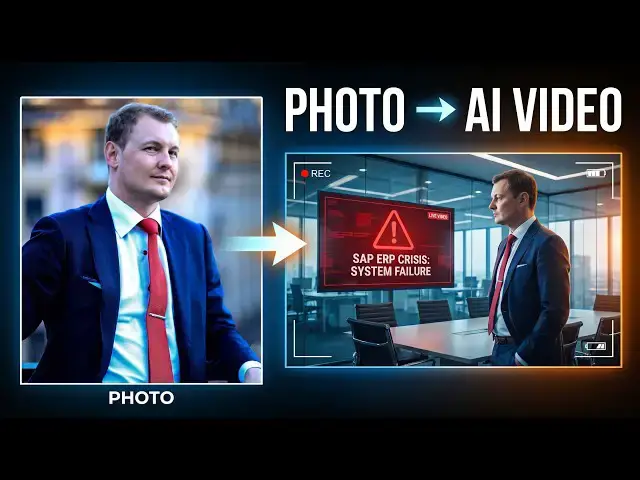
So I will upload a professional headsh
0:48
shot of myself. Uh here we go. I upload
0:56
And I add this headshot to the prompt
1:01
because it will be referenced in the
1:04
created video. So there are different
1:06
models available with Google one and we
1:10
will we will see which one to use. The
1:13
thumbnail apparently needs some time to
1:16
load but let's assume it is. Yes, here
1:20
we go. We have the thumbnail now. So it
1:22
takes some time to load. And here we go.
1:25
This is what we want to create a
1:34
switch because we want
1:38
we want the video. We don't want nano
1:41
banana. We want the video. And uh so
1:46
this is uh this is just the character
1:47
description actually. So let's give me a
1:51
character description
1:54
of myself because the video is about me
1:57
for my LinkedIn. So here we go. I have
2:04
and I describe my character and let's
2:08
go. It is now added as a character. I
2:12
can add a voice. Give it a name. my
2:18
Give me character info
2:24
describe how the character
2:30
to give it more detail so it can then
2:33
animate it better. So here I have my
2:36
character. I can select a voice. It
2:39
should be a male voice. I apparently I
2:43
cannot add my own voice but we will uh
2:47
uh something like uh serious
2:52
uh okay I don't really know let's check
2:55
the voices available for sure I want a
3:02
voice firm maybe firm let's preview
3:06
>> hi there we're introducing a new feature
3:10
>> okay that's good enough I this voice. It
3:13
has my portrait. It can uh create body
3:18
whatever. This is good enough.
3:21
Done. Now that I have my character, it
3:24
is slightly different from the picture I
3:26
gave. But we can now try to create a
3:30
video. So I go back to my prompt for my
3:33
second episode. Create a cinematic. Uh
3:37
and here we go. So I want to create a
3:42
me. So here I have to reference the
3:45
character featuring Yan.
3:49
And here we go. Now just ask it to
3:53
create and we will see what we get with
3:55
this prompt. Uh we can have a look
3:58
deeper look at the prompt. So we asked
3:59
to create a cinematic ultra realistic
4:01
professional corporate consulting video
4:03
featuring myself as character, an
4:05
experienced European digital consultant
4:08
and SAP project manager in his 40s
4:10
wearing a dark tailored shirt in a large
4:13
multinational corporate headquarters. A
4:16
major SAP ERP dashboard shows critical
4:19
errors across finance, logistics, and
4:21
operations. Several executives and IT
4:23
specialists are gathered around a large
4:26
screen, visibly concerned and discussing
4:28
the incident. Yan calmly studies the
4:31
data flow on the screen, ignores the
4:33
obvious error message, then points to a
4:35
separate upstream process, but is
4:37
causing the problem. The team
4:39
immediately realizes he has identified
4:41
the real root cause and with Yan. So
4:45
here probably I should have referenced
4:46
the character to make sure it is uh
4:49
really the right person being chosen but
4:52
I did reference it before. So let's see
4:54
if the AI can gather that. So it ends
4:57
with Yan confidently working towards a
5:00
glass meeting room while the team begins
5:02
implementing his solution. Premium
5:04
global consulting cinematography,
5:06
realistic enterprise environment,
5:08
sophisticated multinational atmosphere,
5:10
sub/p interfaces, data flows, subtle
5:13
tension, natural human movement,
5:16
dramatic but credible, no futuristic
5:18
holograms, no cheesy stock footage,
5:20
right? Should have an onext screen.
5:23
Everyone blamed SAP and the final text
5:26
problem was upstream. So, let's see how
5:29
this goes. Uh it is my first time using
5:32
Google Flow and this was pretty fast
5:34
actually. We already get a result. And
5:37
here this is what I like. We have a
5:39
progress bar. So we have a little idea
5:42
of what's happening once the video start
5:44
generating. It took around I guess two
5:46
minutes to have this video starting to
5:50
generate. So let's see what we will get.
5:52
Do we get a good video? We at 70 80.
5:57
Yes. The video is uh at least that
6:00
should be a video. Okay. So now let's
6:04
check what we got. I will try to open
6:06
this. Uh that's not a video at all. Uh
6:11
why is it a storyboard? Let's go back. I
6:14
asked a video. Ah this is a storyboard
6:18
for the video. So do we kick off this
6:20
one video generation costing 15 credits?
6:22
Okay let's double check the storyboard.
6:25
So, first picture, everyone blamed SAP.
6:28
I guess that's my character right here.
6:32
Then, uh, second picture, there's a
6:35
critical failure on an ERP. Third
6:37
picture, there is someone that isn't me.
6:40
I don't know which character it is, but
6:41
he's looking at screens. Uh, fourth
6:45
picture, uh, there is someone, again,
6:47
it's not my character pointing at the
6:49
screen. Fifth picture, uh, people are
6:52
panicking. Six picture again a character
6:54
that isn't me uh it's not my character
6:57
and finally the problem was upstream and
7:01
at the end expertise that is beyond the
7:06
okay. So that's not correct because the
7:08
character is not referenced. Um
7:20
used. So yeah, I'm not sure what's
7:23
happening. Is not used in since where a
7:28
main character appears. So let's
7:32
see if it can change that. With Google
7:36
one, we get 50 credits a day to
7:39
generate. So here, generating this small
7:41
video cost 15 credits. So theoretically,
7:45
I should be able to create such a short
7:48
video with the credits I get. I don't
7:50
know where to see the credits are here.
7:53
I can see I have 50 Google flow credits
7:57
and the credits are refreshing daily.
8:00
All right, we can also ask to add a
8:03
watermark which is not what I want. So
8:06
actually first generated a dashboard
8:08
which is good because we can alate
8:11
if it is going in the right direction or
8:14
not and here it's not the case. So now
8:16
it will probably generate a new
8:22
uh a new flow of pictures, a new story
8:27
board. Let's see. It is generating
8:35
I guess it is generating the nine
8:37
pictures of this dashboard individually
8:39
and then stitching them together. At
8:41
least I hope that's the case.
8:44
Okay, now the character is there. So,
8:46
it's more or less me. It doesn't really
8:51
uh Okay. No, actually that's not good.
8:54
The character is not good because it
8:56
changed the picture in the character
8:58
generation part. So, no, that's not
9:03
That's not good. Please,
9:17
And now we have to regenerate the
9:19
dashboard. So, so far it did not use any
9:22
uh any credit as far as I can tell which
9:28
and we are still generating
9:36
And now the video actually was lesser.
9:38
The first time it asked me to generate
9:40
the video for 15 credits. Then it asked
9:42
me to generate the video for 10 credits.
9:45
So let's see now how how much credits it
9:48
will uh propose to use. Is it less again
9:52
than before? Um so it's not really clear
9:55
how many credits are necessary. I tried
9:59
to look at the credit consumption
10:02
separately and it is a little confusing.
10:05
Um I will not here go into detail of
10:08
Google flow but uh yeah the credit price
10:11
is a little confusing. Oh here we go.
10:14
The next the next storyboard is
10:16
available. It looks it looks good
10:19
enough. All right that's enough
10:21
generation. At least the character is
10:23
more or less me. Approve. And now the
10:25
video cost 12 credits. So each single
10:29
time it is a different amount of
10:31
credits. But let's approve this video
10:33
generation now costing 12 credits. So it
10:37
generated the new storyboard grid using
10:39
my picture as reference. It is now ready
10:41
to animate this into the final
10:43
consulting video. It's going to generate
10:45
a cinematic video that follows the
10:47
sequence in the storyboard featuring my
10:49
likeness as a lead lead consultant
10:51
resolving the sub crisis. It generated
10:54
the updated storyboard grid using my
10:57
photo reference and is now proceeding to
10:59
animate this into the final cinematic
11:01
video. It is now generating the video
11:04
and what I like in Google flow. Again,
11:06
we have a progress bar here and we have
11:09
kind of an idea how long it will take
11:11
and where we are in the process
11:13
generation once the the pre instructions
11:18
have been read and the video itself
11:21
starts being generated. Uh, I guess
11:23
frame by frame. And here we already have
11:25
the video ready. Oh, that's so fast. All
11:30
right, the video is pretty good now.
11:33
That looks like me. And the video is
11:36
nice. All right. Actually, I like it. I
11:39
not sure if we have some
11:43
I'm not sure if we have sound. Uh, so
11:47
let's check it. I will play it and see
11:53
>> Everyone blamed SAP but Clarity sees
11:56
what others miss. The problem was
12:00
The Everyone blamed SAP.
12:02
>> Video generated with Google Flow. So try
12:05
it for yourself or for a deeper video
12:09
generation possibilities. Try the
12:12
generative AI linked in description or
12:14
yb.digital/art. digital/art