0:00
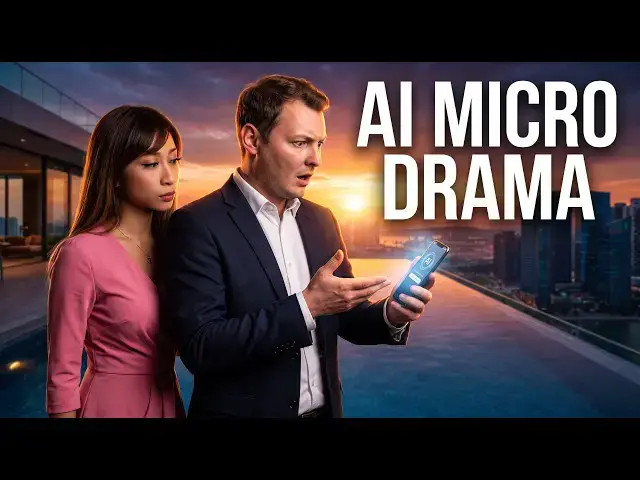
continue generating AI micro drama and
0:03
we will try grog imagine 1.5 on open art
0:08
today link in the description
0:12
So first of all we have to define our
0:15
characters in this tool because I don't
0:17
have characters in that tool. So I go
0:19
here to character option and I will
0:23
create my own characters as I did uh in
0:26
different tools. So here I create my
0:29
character. I select start from an image
0:32
because I have pictures of my character.
0:35
I put the frontfacing image and I can
0:39
use up to four pictures. So here's the
0:42
first picture. I start with my
0:44
supporting character Anna. So here are
0:48
one picture, two picture.
0:51
I will put four of her pictures. Uh here
0:55
I have one more. And here the last one.
0:59
So these are additional on girls for
1:04
Her name is Anna. Oops. The upload
1:09
didn't go through the last picture.
1:13
All right. And in my generative AI tool,
1:17
I have all the details about her
1:18
character. So I copy and paste it so it
1:23
knows her background story. I can also
1:24
select a voice. So I could either create
1:26
a new voice by cloning.
1:30
Uh so I could upload audio. Uh so this
1:34
actually I do have some audio but we
1:38
will not do it right now. Uh I will
1:42
simply uh I will let it flow like this
1:45
for that uh current video. Now my
1:49
character Anna is created. I need to
1:52
create my second character. the main
1:55
character which is Michelle. So again I
1:58
have already some background story.
2:04
All right and is ready for the spotlight
2:06
and I will create a new character
2:08
starting from an image again. I will use
2:12
my pictures. So here a picture of myself
2:18
because my character is generally in the
2:20
pool. Another picture of myself uh at a
2:26
restaurant. I have I had them below.
2:34
Okay. I don't find them anymore.
2:38
All right. So, whatever. I will use this
2:43
I will I need to wait for the previous
2:45
upload to be over to add the next
2:47
picture. Then another pull picture.
2:54
I can meanwhile paste already the
2:56
background story. Enter the character
2:58
name which is Michelle
3:01
and add one more angle.
3:06
One more angle. I will probably add the
3:08
professional pictures. Ah, here. Here.
3:11
What I was looking for
3:15
my restaurant picture. So, I can delete
3:25
And one more angle. I will put a
3:27
professional picture.
3:31
Professional picture. I have it right
3:34
here. All right. My character is now
3:37
defined. But I will also add a voice. So
3:40
I can create a new voice and clone my
3:43
voice. So I will record an audio
3:51
it I will record audio now and it will
3:54
generate then an audio based on my
3:56
voice. So cloning the voice cost some
3:59
credits 20 credits. Um but it's not much
4:03
to have your own voice cloned on that
4:06
tool. Um I can record up to 60 seconds
4:09
but now 20 seconds should be enough.
4:12
Okay, let's let the AI clone my voice
4:16
based on that recording. It's enough for
4:19
our AI micro drummer. Of course, if you
4:21
want more professional result, you
4:23
should provide a better setup. So, the
4:26
task is generating in the background.
4:30
That's fine. So, I cannot select it yet.
4:32
It takes some time. Meanwhile, I create
4:34
my character and once the voice will
4:36
have been processed, I will be able to
4:38
add the voice to that character. Let's
4:42
see how long it takes. It takes.
4:45
All right. Meanwhile, I can go on a
4:48
video. I uh will do again a text to
4:52
video. So, I can select my model. I
4:54
already selected Grock imagine 1.5 which
4:59
I have here a first generation of
5:01
cinematic video. Let's see what it does.
5:03
Because I can use a reference. It
5:05
includes audio and we can use the low
5:08
resolution to create a simple video. Um,
5:14
I will ask my AI to give me a script for
5:20
Uh, 15 seconds vertical format. Uh, no,
5:25
I don't need to add this. Uh, it will be
5:31
Uh I double check that the output we
5:33
generate the maximum time is 15 seconds.
5:36
So let's do that 15 seconds.
5:41
Oh, here we go. We have Anna and
5:43
Michelle only them uh cinematic ultra
5:46
realistic 15 seconds micro drama at the
5:49
luxurious Petron rooftop at sunset.
5:54
He's wearing a stylish black bikinino.
5:56
Anna is wearing her pink dress. Uh so
6:00
this is a mistake. No Anna is wearing
6:08
Uh just what is the cliffer and turn the
6:11
phones towards him. Michelle sees the
6:13
message and his expression immediately
6:15
change. That is fine. That is a good
6:18
enough cliffhanger. So here we go.
6:23
We have all the details. Uh, so we will
6:27
create this ultra realistic micro drama.
6:30
Now we can add our character. So we have
6:36
If I go to character, can I now
6:40
uh check my character?
6:44
I have to go back to character
6:53
Uh, where are my characters?
6:59
I'm getting a little lost here.
7:07
where are my characters?
7:10
A browser library. All right, here my
7:13
character. I will modify it. Check if I
7:16
can use the voice. Yes, I can now select
7:18
this voice which is recording based on
7:21
my voice. and Michelle will the
7:24
character will use this voice. All
7:26
right. Now that the voice has been
7:28
assigned to the character, I can go back
7:30
to video. I have my two characters. I
7:32
have to reference them in the prompt.
7:35
So, make sure that Michelle is
7:39
here at Michelle and Anna is here. So I
7:43
did give them the uh same name but it
7:47
doesn't mean that the AI will
7:50
necessarily understand that Anna
7:52
character is Anna in the prompt and
7:54
Michelle character is Michelle in the
7:56
prompt. So I will do it here to be sure
8:01
that everything's clear.
8:04
Michelle resting beside Anna.
8:10
and notices Anna's expression. So here I
8:12
will reference them every single time to
8:17
make sure the AI does not misunderstand
8:20
which character does what. And
8:29
I will now select to create a vertical
8:31
video 15 seconds. I will use the lower
8:35
resolution 689. So it is faster to
8:38
generate and it uses less credits. All
8:41
right, let's go. We have everything. And
8:44
now all we have to do is to click on
8:46
generate button. And let's see how long
8:48
it takes. 689 credits to generate our 15
8:53
seconds micro drama of the day. And if
8:56
we have a look at the credit cost. So
9:00
here it already spent the 689 credits
9:03
for Groja and 1.5 15 seconds video which
9:07
is the maximum we can do with Grock and
9:09
also spent 20 credit with open art voice
9:13
clone. So 20 credits to clone my voice.
9:18
Uh now if we have a look at how much it
9:24
credits. Uh so if you were to buy a
9:27
starter plan uh with 689 credits, you
9:31
could uh create uh uh around uh six
9:36
videos uh like that probably per month
9:39
with the starter plan. And if you use
9:41
the wonder plan, which is the best
9:43
value, of course, you could uh create so
9:46
many videos uh probably not 100, but uh
9:50
like 70 80 videos per month uh like
9:55
So you could also uh oh and the video is
9:58
already ready already. So here we go. We
9:59
have generated our video with Gro
10:01
imagine 1.5 that was so fast. So let's
10:05
have a look and if it's fine I will stop
10:07
the video. If it's not so good I will
10:10
maybe modify it. So let's go. Our video
10:13
generated with again gro imagine 1.5 a
10:18
15 seconds videos with two characters
10:20
reference in vertical format 480p.
10:25
Let's check uh how it is.